
A kickoff meeting is a crucial step in any eLearning project. It is the first opportunity for the project team, the client, and the subject matter experts to get on the same page, align their expectations, and define the scope and deliverables of the eLearning initiative. A well-planned and executed kickoff meeting can set the tone for a successful eLearning project; while a poorly managed one leads to confusion, delays, and dissatisfaction.
So how can you plan and conduct an effective eLearning kickoff meeting? We’ll unpack some tips and best practices to help you.
How to Choose Participants for the Kickoff Meeting
The first thing you need to do is to decide who should attend the kickoff meeting. Ideally, you want to include people who have a stake in the eLearning project, who can provide valuable input and feedback, and who can influence the decision-making process. Depending on the nature and size of the project, you may want to invite some or all the following:
- The project sponsor: This is the person who has initiated and funded the eLearning project, and who has the final authority and accountability for its success. The project sponsor can help you clarify the business goals, objectives, and expectations of the eLearning project, as well as secure the necessary resources and support.
- The project manager: This is the person who is responsible for planning, executing, monitoring, and controlling the eLearning project. The project manager can help you define the project scope, timeline, budget, quality standards, communication plan, and risk management plan.
- The (Lead) instructional designer: This is the person who is responsible for designing and developing the eLearning content, based on the learning needs analysis, instructional strategy, and learning objectives. The instructional designer can help you determine the best format, modality, interactivity level, and assessment methods for the eLearning content.
- The subject matter experts (SMEs): This is the person/s who has in-depth knowledge and expertise in the topic or domain of the eLearning content. The SME’s can help you validate the accuracy, relevance, and completeness of the eLearning content, as well as provide feedback and suggestions for improvement.
- The learner representative/s: This is the person/s who represents the target audience of the eLearning content. The learner representative can help you understand the characteristics, preferences, motivations, challenges, and expectations of the learners, as well as provide feedback and suggestions from their perspective.
You may also want to include other stakeholders such as graphic designers, developers, testers, quality assurance specialists, trainers, facilitators, or evaluators, depending on your project needs and resources.
But remember: The more participant you invite, the less time available for individual participants to contribute to the session.
What are 5 Critical Agenda Items for the Kickoff Meeting
The agenda of the kickoff meeting should aim to accomplish three main goals: to introduce the project team and stakeholders; to establish a common understanding of the eLearning project; and to agree on the next steps and action items. Here are five critical agenda items that can help you achieve these goals:
- Project overview: This is where you provide a brief introduction to the eLearning project, including its background, purpose, scope, objectives, deliverables, timeline, budget, quality standards, success criteria, and risks. It helps to kick things off with a detailed project org chart, explaining the project hierarchy to participating stakeholders.
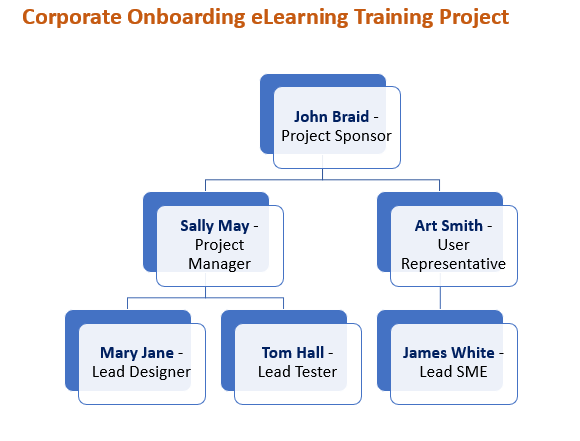
You should also explain how this eLearning project aligns with the business goals and strategy of the organization.
- Roles and responsibilities: Here’s where you clarify who is involved in the project, what their roles and responsibilities are, how they will communicate and collaborate with each other, and what their expectations are from each other. You should also define the key decision-making and conflict resolution processes.
- Learning needs analysis: Take time to present the results of your learning needs analysis (LNA), which is a systematic process of identifying and analyzing the learning gaps and needs of your target audience. You should also share your instructional strategy and learning objectives derived from your LNA.
- Content outline: This is where you provide an overview of your eLearning content structure and design. You should include information such as:
- The number of modules or lessons
- The titles and descriptions of each module or lesson
- The learning outcomes of each module or lesson
- The duration of each module or lesson
- The format and modality of each module or lesson (e.g., video lecture, interactive simulation, scenario-based game)
- The interactivity level of each module or lesson (e.g., passive, limited, moderate, high)
- The assessment methods of each module or lesson (e.g., quiz, assignment, project, group participations)
- Next steps and action items: Before wrapping up, it’s important to summarize what’s discussed and agreed upon during the kickoff meeting; assign tasks, responsibilities, and deadlines to each team member or stakeholder; identify any open issues or questions that need further clarification or resolution; confirm how you plan on tracking and reporting progress; and schedule the next meeting or milestone.
5 Tips for a Successful Kickoff Meeting
Here are some tips that can help you plan and conduct a successful kickoff meeting:
- Plan and prepare: Before the kickoff meeting, you should do your homework and gather all the relevant information and data about the eLearning project. You should also prepare a clear and concise agenda, a presentation deck, and any supporting documents or materials that you need to share with the participants. You should also send the agenda and the meeting invite to the participants well in advance, and ask them to confirm their attendance and prepare any questions or inputs they may have.
- Have the right stakeholders: Make sure that you invite the right people to the kickoff meeting – those who have a stake in the eLearning project, who can provide valuable input and feedback, and who can influence the decision-making process. You should also ensure that they are available and committed to attend the kickoff meeting, and that they have the authority and accountability to make decisions or approve changes.
- Set expectations: At the beginning of the kickoff meeting, you should set the tone and expectations for the meeting. You should explain the purpose, goals, and agenda of the meeting; establish some ground rules and norms for participation; and encourage everyone to introduce themselves and share their roles and interests in the eLearning project. You should also emphasize the importance of collaboration, communication, and respect among the team members and stakeholders.
- Define scope and responsibilities: During the kickoff meeting, you should clearly delineate the expectations from each team member or stakeholder during the project. You should define their roles and responsibilities, their deliverables and deadlines, their communication and collaboration methods, and their feedback and approval processes. You should also clarify any assumptions, constraints, dependencies, or risks that may affect the eLearning project.
- Follow up: After the kickoff meeting, you should follow up with the participants and send them a summary of the discussions, and items agreed upon during the meeting. You should also include any action items, open issues, or questions that need further clarification or resolution. You should also thank them for their time and participation, and stress the importance of their tasks, responsibilities, and deadlines.
Putting it All Together
To help you pit it all together, here’s an example of an ideal kickoff meeting agenda for a hypothetical eLearning project. We’ve also included with some verbiage on how the project team should conduct the session:
| Project Name: | Corporate Onboarding Training Development |
| Meeting Date: | March 13th, |
| Time: | 9:30 AM |
| Location: | Main Boardroom, Fifth Floor |
| List of Invitees (and proposed role/title): |
AGENDA
1) Intro & Greetings (5 minutes): Our Project Sponsor will set the tone of the meeting, and kick things off with a brief round of introductions.
2) Project overview (10 minutes): The PM will then provide a brief overview to the project, its objectives, scope, timeline and deliverables. We will also explain how the eLearning solution will support the business goals and the learners’ needs.
3) Roles and responsibilities (10 minutes): Next, we’ll clarify the roles and responsibilities of each stakeholder involved in the project, including the project sponsor, the project manager, the subject matter experts, the instructional designers, the developers and the testers. We will also define the communication channels and the escalation process for any issues or risks.
4) Findings and summary of learning needs analysis (15 minutes): Our Lead Analyst will present the results of the learning needs analysis that we conducted to understand the target audience, their current knowledge and skills, their learning preferences and their performance gaps. We will also share the key insights and recommendations that emerged from the analysis.
5) Proposed content outline (15 minutes): Our Content Design Lead will walk you through a draft of the content outline that we have developed based on the learning needs analysis. The content outline will include samples of proposed learning objectives, the topics, the subtopics, the activities and the assessments for each module of the eLearning course. We will solicit your feedback and suggestions on the content outline and make any necessary revisions.
6) Wrap-up, next steps and action items (10 minutes): We will summarize the main points of the meeting, confirm the next steps and assign action items to each stakeholder. We will also agree on a date and time for the next meeting and thank everyone for their participation.

Take charge of your eLearning projects like a pro! Elevate your courses to the next level and drive real results. Don’t miss out – enroll today!
Leave a Reply